Master Your Day: The Instant Download Hourly Planner
Let’s be honest. We live in an era of constant notification pings and digital distraction. While apps are convenient, there is a tactile, psychological power in putting pen to paper. There is a specific clarity that comes from physically blocking out your day, hour by hour. If you have been struggling with time management, or if you are a content creator looking for a profitable niche, the Hourly Daily Planner is exactly what you need. This isn’t just a piece of paper; it is a system designed for focus, available as an Instant Download that you can print in your home office or send to your nearest print shop.
Why the Physical Hourly Format Wins
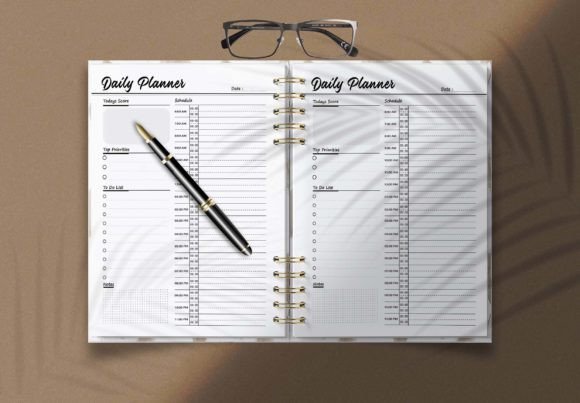
Digital calendars are great for appointments, but they often fail us when it comes to deep work. An Hourly Daily Planner forces you to confront the reality of time. By breaking the day into 60-minute or 30-minute increments, you move from vague intentions ("I'll work on the blog today") to actionable blocks ("9:00 AM - 10:00 AM: Write intro for new post"). This is the core of any high-level Productivity Planner. It minimizes decision fatigue because you have already decided what needs to happen.
The visual layout of this specific template is clean and uncluttered. It doesn't scream for attention with neon colors; instead, it uses a minimalist aesthetic that allows you to focus on the content—your tasks. Whether you use it as a Daily To Do List or a strict Day Planner PDF, the structure provides a visual hierarchy that guides your eye naturally from morning to evening. It creates a sense of calm amidst the chaos of a busy entrepreneurial or creative life.
A Game Changer for KDP Publishers
If you are in the world of self-publishing, specifically on Amazon’s Kindle Direct Publishing (KDP), you know that the market for low-content books is competitive. However, the demand for functional planning tools never drops. This template is not just for personal use; it is a significant business asset. The product is formatted in the standard 8.5×11in format, which is the industry standard for US letter size and the most popular trim size for planners on KDP.
Uploading a Daily Planner PDF directly to KDP can sometimes be tricky if the margins aren't perfect, but this file is ready to go. However, the real power lies in customization. The package includes editable vector files. If you have even a little bit of knowledge about Adobe Illustrator, you can edit this template to make it your own.
Think about it: you can change the fonts, adjust the layout, add your branding, or insert specific sections relevant to a niche audience, such as "Mom Planners" or "Fitness Trackers." Because the file allows for AI and EPS editing, you have total control over the design assets. You aren't just buying a planner; you are buying a master template that you can resell infinitely. This is a low-risk, high-reward opportunity for any publisher.
Design Versatility and File Formats
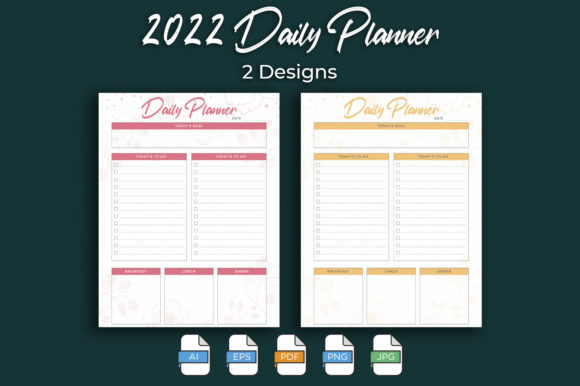
One of the standout features of this Instant Download package is the sheer variety of file formats provided. We often see products that only offer a PDF, leaving designers frustrated when they want to make tweaks. Here, you are equipped with AI File (Editable), EPS File (Editable), PDF File (Ready To Upload), JPG Include, PNG Include, and SVG Include.
Why does this matter? It offers total flexibility for different workflows.
- For the Designer: You can open the AI or EPS file to fully customize the typeface and layout. Want to change the font to a modern sans serif font or a sophisticated serif font? Go for it. The template is a canvas.
- For the Hobbyist: If you just want to print it today, the PDF is ready. You can print it at home, punch some holes, and put it in a binder immediately.
- For Digital Use: The PNG and JPG files are perfect for digital planners (like for GoodNotes or Notability) or for creating mockups for your social media graphics.
It is important to note that the fonts are not included. This is actually a benefit. It means you aren't locked into a specific style. You have the freedom to use any font as you wish when you edit the template, allowing you to match the planner perfectly with your brand identity or personal style.
Practical Applications: From Boardroom to Craft Room
The utility of a high-quality Hourly Daily Planner extends far beyond simple scheduling. Let's look at how different professionals can leverage this tool:
- For Entrepreneurs & Marketers: Use the planner to map out content calendars. Visualizing your day allows you to batch tasks effectively. You can dedicate specific hours to email outreach, strategy sessions, and creative work without overlap.
- For Graphic Designers: Use the template to track client revisions and project deadlines. Better yet, customize the layout to create a specialized planner for your clients, adding value to your service packages.
- For Crafters & Hobbyists: Planning a wedding, a home renovation, or a large DIY project? Breaking it down into daily, hourly chunks makes massive projects manageable.
The 8.5x11 inch size is large enough to write detailed notes but standard enough to fit in any bag or filing cabinet. The design focuses on functionality, ensuring that the visual hierarchy supports readability rather than hindering it. It is a tool that respects your time.
Conclusion: Take Control of Your Schedule
Productivity isn't about doing more; it's about managing your energy and focus. This Productivity Planner gives you the structure to do exactly that. Whether you are a KDP publisher looking to expand your portfolio with a high-quality Day Planner PDF, or an individual looking to bring order to a chaotic schedule, this Instant Download is the solution.
Don't let another day slip by in a blur of unorganized tasks. Download the files, open up Illustrator (or just hit print), and start owning your hours. It’s a simple change that can yield massive results in your professional and personal life.